
Amazon Margin Reconciliation AMAZON
Per-SKU margin and settled payout share % in one click.
Step 1 — Download these files from the marketplace
Reconcile against money actually received. Include only the settlements whose payout reached your bank inside the month you are reporting — tally each settlement total with your bank statement first. If the last settlement of the month is credited in the next month, leave it out and include it in next month's report.
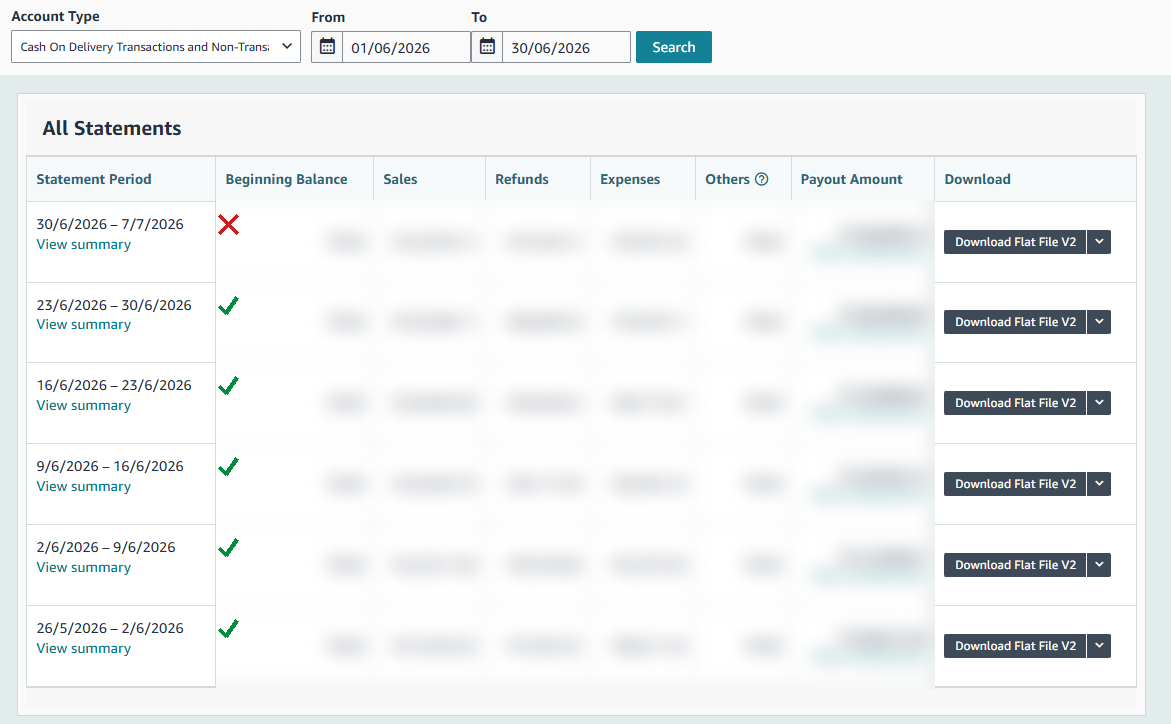
Amazon Settlement Reports — raw .txt exports (multiple: select them all together), OR one merged .xlsx
WHERE: Seller Central → Payments → All Statements → set the date range → click "Download Flat File V2" on each statement, one at a time. Repeat for both accounts (COD and Prepaid). Files arrive named like 27160274822.txt. WHICH ONES: only the settlements whose period END date falls in the month you are reconciling. Reconciling April 2026 → include a 28/03–04/04 settlement (it ends in April); skip 26/04–03/05 (it ends in May). THEN: select all those .txt files here together — a .zip of them also works. The tool merges them, confirms each file is complete, and works out the month itself. The report lists every settlement it used, so you can confirm none was missed. OLD WAY (still supported): paste all settlements into one Excel file and upload that single .xlsx, with the month in its filename (e.g. Settlement_Apr_2026.xlsx). Do not mix .txt and .xlsx in the same run.
SKU Cost Master (.csv or .xlsx)
Two columns: SKU and Cost per unit. Template below.
Fill it once — Column A: your SKU exactly as on the marketplace, Column B: cost per unit. Reuse it every month.
Step 2 — Upload & generate
What this report does
Use case
Run per settlement cycle. Know your real per-SKU margin after Amazon's fees and refunds — and exactly which SKUs to reprice, push or drop.